Every number on this site comes from a single 648-row benchmark run, and one auditing script derives every quoted figure from it directly. This page explains what a single row of that run actually measures, what the grid covers, and exactly how to regenerate the whole thing.
A benchmark run here is not a timed function call. It’s a full command-line invocation of an implementation, measured end to end as a subprocess, so what I record is the cost of actually using the tool rather than the cost of its inner loop in isolation. The harness launches the implementation’s CLI, hands it a dataset on disk, and times everything from there: process launch, reading the CSV, fitting K-Means for every \(k\) from 1 to k_max, and writing all the resulting cluster columns back out. Startup and I/O are in the measurement on purpose, because that’s where a surprising amount of the Python tax lives, and hiding it would make the comparison prettier than it is true.
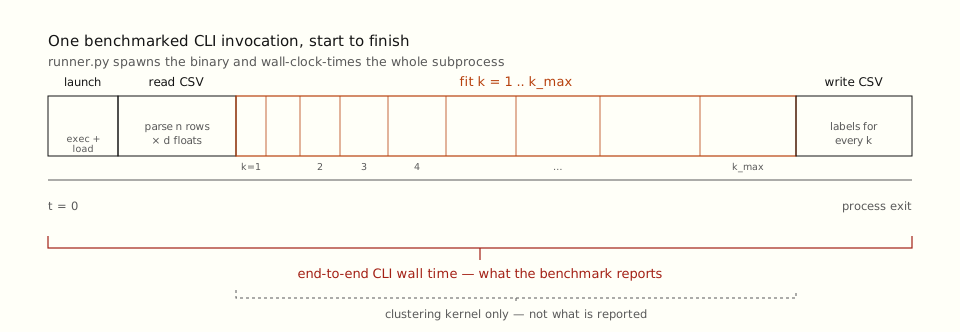
k = 1..k_max fit, then the CSV write — not the clustering kernel in isolation. Startup and I/O are inside the measurement on purpose.The grid
The final suite is 648 rows: four implementations across a sample axis that doubles from 1,000 to 256,000 rows, crossed with feature counts of 2, 8, and 32 and k_max values of 8 and 32, each run three times. Every one of the 648 rows completed without an exit-code failure, and none is missing its quality metrics. The dataset for a given setting is generated once and reused across all four implementations within a repeat, which is what makes the comparison paired: when I quote a speedup, it’s Python’s time divided by another implementation’s time on the identical data, not two independent medians lined up next to each other.Pairing matters because the grid mixes easy and hard rows. An unpaired ratio of medians can drift depending on which rows happen to land in each implementation’s distribution; a paired ratio cancels the per-row difficulty out.
What each row records
The harness measures four kinds of thing per run, and it’s worth being precise about each, because the caveats are where benchmarks usually mislead.
Runtime is time.perf_counter wrapped around the subprocess, capturing the full end-to-end cost described above.
Memory is psutil.Process.memory_info().rss, polled every 10 ms while the implementation runs, and reported as the peak of those samples. That’s a sampled process-RSS estimate, not a platform max-RSS reading, so a short allocation spike between two polls can be missed.In practice the gaps between implementations are large enough, Rust under a megabyte per thousand rows against scikit-learn above twelve, that the sampling error doesn’t change the ranking. I’d trust the order and the order of magnitude, not the last decimal.
CPU and resource use come from resource.getrusage(RUSAGE_CHILDREN): child-process CPU time, from which I derive effective cores (CPU time over wall time), plus context switches and the RSS and CPU figures normalized per thousand samples.
Quality is scored two ways. The adjusted Rand index and NMI compare the result against the ground-truth labels the data was generated from, always on the full dataset. The internal metrics (silhouette, Davies-Bouldin, Calinski-Harabasz) run on the full data through 32k rows and on a deterministic 10k-row sample above that, because silhouette is quadratic in the number of points and would otherwise dominate the runtime of the largest workloads on a laptop.
The seeding policy, and what it does to fairness
Every run uses k-means++ seeding with a single start, and scikit-learn is held to n_init=1 to match. This is a deliberate choice and it cuts both ways. It makes the comparison about implementation mechanics under one common policy, which is the comparison I wanted. But scikit-learn defaults to ten restarts and keeps the best, so holding it to one start understates what it does in normal use. Read the quality numbers as “all four under the same single-start rule,” not as “scikit-learn at its best.” A restart-policy ablation would be a separate and interesting study; this isn’t it.
The interactive view
The dashboard is rendered from the same run by the dashboard build script. It plots against nominal workload units, \(n_{\text{samples}} \times n_{\text{features}} \times \sum_{k=1}^{k_{\max}} k\), rather than connecting points by sample count alone, so that rows with different feature counts and k-sweeps aren’t drawn as if they were the same workload.
Reproducing it
Everything is driven from pixi, which pins both toolchains. The three commands that matter are building the Rust binary in release mode, running the suite, and rebuilding the dashboard from the results it writes:
pixi run build-rust
pixi run python src/run_current_benchmark_suite.py
pixi run python src/build_dashboard.py
To regenerate the audited figures I quote elsewhere on the site, run the facts inventory against the same results:
pixi run python src/analysis_audit.py
That script is the single source of truth for every quoted median, speedup, and quality number. If a figure on this site disagrees with its output, the script wins.